
Vehicle RC Status Check
A Vehicle Registration Certificate (RC) is an official document that confirms a vehicle has been registered with the relevant Regional Transport Office (RTO) in India. It applies to cars, motorcycles, commercial vehicles, and other registered vehicles, and serves as proof of the vehicle’s registration.
Through official online transport services, vehicle owners can also check their RC application status without visiting an RTO. Depending on the service available, users may be able to track applications related to new vehicle registration, RC renewal, duplicate RC issuance, ownership transfer, and other registration-related requests.
What is RC Status?
RC status tells you exactly where your vehicle’s registration stands right now. It shows whether your registration is active, still under process, transferred to a new owner, or no longer valid. If you’ve applied for a new RC, a renewal, or an ownership change, the RC status check lets you track your application from start to finish.
A typical RC status check reveals:
- Vehicle registration number
- Owner’s name
- Registration date
- Registration validity
- Vehicle class and fuel type
- Insurance and fitness details
How to Vehicle RC Status Check on the VAHAN Portal
The VAHAN portal is the Ministry of Road Transport and Highways’ (MoRTH) official platform for vehicle services. You can check your Registration Certificate (RC) status, pay road tax, view permit details, and access dozens of other RTO services from one place. The portal runs 24/7 and works on both desktop and mobile.
Follow these steps to check your RC status.
- Step 1: Open the VAHAN Portal, Visit vahan.parivahan.gov.in in your browser. On the homepage, click “Know Your Application Status.”
- Step 2: Enter Your Vehicle Details, Type your vehicle registration number (for example, KA01AB1234) and your application number in the fields provided.
- Step 3: Submit and View Status, Enter the captcha code and click Submit. The portal displays your current RC status, application stage, and any pending action.

- Registration number is typically required for issued RCs, while the application number is used for pending or in-process RC applications.
- Fill in the Captcha code and click “Search“. The portal will display your RC status and other vehicle owner details. You’ll see key information such as:
- Owner name
- Registration date
- Validity
- Insurance status
- PUC details
- Current RC application or issuance status
Check RC Application Status Using mParivahan App
- Download the mParivahan mobile app on your Android or iOS device; it is one of the simplest ways to track your vehicle owner detail registration progress.
- Install the app and create an account, or log in if you already have one.
- Follow this step-by-step guide to check your RC application status using the mParivahan app in a simple and easy way.
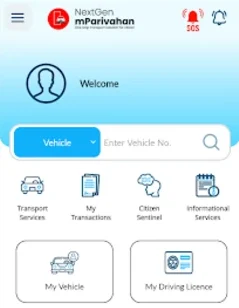
Click on “Vehicle Related Services” and then “Application Status”.

- Check through Application Number or Vehicle Registration Number.
- Submit to Vehicle RC Status Check.

What to Do After Checking the Status?
Application Under Process
This means your request has been successfully submitted and is being reviewed by the RTO. The authorities are verifying your documents and details. At this stage, no final decision has been made yet.
RC Approved
The Vehicle RC Status Check indicates that your application has been verified and accepted by the RTO. All required documents and details have been found correct.
RC Generated
When the status shows “RC Generated,” it means your Registration Certificate has been created in the system. The smart card or digital RC has been prepared.
RC Dispatched
This means your Vehicle RC Status Check has been printed and sent to your registered address through postal or courier service.
Application Rejected
If your application shows “Rejected,” it means there was an issue with the submitted details or documents. Common reasons include incorrect information, missing documents, or verification failure.
Where to Check RC Status (Official Channels Only)
- Parivahan Sewa Portal — parivahan.gov.in (the main MoRTH portal)
- VAHAN 4.0 — the centralized national vehicle registry, used by every Indian state in 2026
- NextGen mParivahan App — Android and iOS, the upgraded mobile app launched for 2026
- DigiLocker — for storing and accessing your digital RC anytime
- State Transport Department websites — for state-specific services and tax payments
Information You Get After Checking
- Owner name (partially masked for privacy in 2026)
- Vehicle make, model, and fuel type
- Registration date and RTO code
- Insurance validity (linked in real-time with the Insurance Information Bureau)
- PUCC (Pollution Under Control Certificate) expiry
- Fitness certificate status — including the latest ATS (Automated Testing Station) report for older vehicles
- Hypothecation status (whether a bank loan is active on the vehicle)
- Tax payment status
- Blacklist flag (pending court cases, unpaid challans, or serious offences)
Latest 2026 Updates You Should Know
- Mobile OTP login is now mandatory. Anonymous lookups are restricted. You must verify with your mobile number on the Vahan portal before viewing details.
- Aadhaar e-KYC is the new standard for most RTO services — including ownership transfer and address change.
- Insurance and PUC data sync in real-time. Driving without a valid PUC can trigger an automatic ₹10,000 e-challan.
- ATS reports are mandatory for older vehicles. The fitness test now includes a digital Automated Testing Station report. Always ask for it when buying a used vehicle.
- Form 29 + Form 30 with Aadhaar OTP are required for ownership transfer. Both seller and buyer must authenticate.
- HSRP is mandatory for every vehicle in India — including older ones. Many RC services now check HSRP compliance before processing.
- Vahan-mParivahan sync window is 24–48 hours. Updates made on state portals reflect in your mParivahan dashboard within this period.
Common Issues & Fixes
- Wrong vehicle number format — always use uppercase, no spaces (e.g., DL01AB1234).
- “Application not found” — the data may take 24–48 hours to sync after submission.
- Login loop on mParivahan — clear app cache and data, or reinstall the app.
- Server downtime — try late-night hours or switch to the state RTO portal.
- RC printed but not delivered — track via India Post; if undelivered, it returns to the RTO for re-dispatch.