mParivahan – Digital Driving Licence & Vehicle RC
mParivahan is an official mobile app by the Government of India that lets you store and check your driving licence and vehicle documents on your phone; no need to carry paper documents.
Parivahan Sewa (parivahan.gov.in) is the official website run by the Ministry of Road Transport and Highways (MoRTH), where you can access all transport-related services online.
Services available on this platform:
- Apply for Driving Licence
- Apply for Learner Licence
- RC Services (duplicate RC, address change, transfer)
- Vehicle Fitness Certificate
- Permit Services
- Online Fee Payment
- Appointment Booking
- And more!
What is mParivahan – Overview
With the mParivahan app, users can keep digital versions of their Driving Licence (DL) and Registration Certificate (RC) on their smartphones, reducing the need to carry physical documents. These digital documents can be presented when required during travel or traffic checks, subject to applicable government rules.
The app brings several transport-related services together in one place. Users can check vehicle and licence information, view challan details, and access other available Parivahan services without visiting an RTO for every basic requirement. mParivahan is part of India’s digital transport ecosystem and is designed to make access to vehicle and driving licence information more convenient.
Download and Install the mParivahan App
For Android Users:
- Open Google Play Store on your device.
- Type mParivahan in the search bar.
- Download and install the app.

For iOS Users:
- Open Apple App Store on your phone.
- In the search bar, search mParivahan.
- Click Get to download and install the app.
Once installed, simply register with your mobile number, link your Driving Licence and Vehicle RC, and you’re all set. Your important transport documents are now safely stored in your pocket, available anytime you need them.
Why You’ll Love It:
- ✅ No more carrying physical documents; your DL and RC are always with you
- ✅ 100% free to download and use
- ✅ Officially recognized by traffic police across India
- ✅ Safe, secure, and government-backed
- ✅ Works smoothly on both Android and iOS devices
- ✅ Easy setup, takes less than 2 minutes!
Note
Check the developer name before installing (National Informatics Centre – NIC) before installing the app, and make sure you download only the official mParivahan app from trusted app stores.
Signing Up on the mParivahan App
Creating your account on the m Parivahan App is quick, easy, and completely free! In just a few simple steps, you can get started and carry all your important vehicle documents right in your pocket- no more worrying about forgetting your Driving Licence or RC at home.
Once you sign up, you get instant access to your digital Driving Licence, Vehicle RC, and other transport services, all in one place, available 24/7 on your smartphone. Whether you are at a traffic check or need to verify your vehicle details, everything is just a tap away.

- Install and open the app on your phone
- Tap on Sign Up / Register option

- Enter your active mobile number.
- Make sure the number is working because you will get an OTP.
- Enter the OTP received on your phone.
- Tap “Verify“.
- Enter basic details like:
- Name
- Email (if required)
- Create PIN / Password
- Set Username and Password: Choose a unique username and create a strong password to keep your account safe.
- Security MPIN: Set a 4-digit mobile PIN to log in quickly and securely.

- Submit details.
- Your account will be created successfully.
Services Available on mParivahan App & Portal
1. Digital Driving Licence (DL)
Store your Driving Licence digitally on your phone. It is legally valid and accepted by traffic police across India.
2. Digital Vehicle RC (Registration Certificate)
Carry your Vehicle Registration Certificate on your phone. No need to keep the original document in your car all the time.
3. Vehicle Details Search
Easily search and check details of any registered vehicle in India — owner name, registration date, insurance status, and more.
4. Traffic Challan (Fine) Check & Pay
Check your pending traffic challans and pay them online in just a few clicks — quick, simple, and paperless.
5. Driving Licence Status Check
Track the status of your new or renewed Driving Licence application without visiting the RTO office.
6. RC Status Check
Check the status of your Vehicle Registration Certificate application anytime, from anywhere.
7. Fancy/Choice Number Booking
Book your favourite or choice vehicle registration number online through the portal — easy and convenient.
8. Pollution Certificate (PUC) Check
Check the Pollution Under Control (PUC) certificate status of your vehicle instantly.
9. Insurance Details Check
View and verify your vehicle’s insurance details directly through the app — stay updated and avoid penalties.
10. Permit & Tax Details
Check your vehicle’s permit and road tax payment details without any hassle.
Virtual Driving License (DL)
A Virtual Driving License (DL) is a digital version of your physical driving licence available on your mobile phone. You can access it through the mParivahan app,
- Open the app and log in to your NextGen mParivahan account.
Then tap on My Virtual DL to view your digital driving licence.

- Enter Driving Licence detail, “Driving Licence No” and “Date of Birth“.
- View information like:
- License holder’s name
- License type (e.g., LMV, MCWG, HMV)
- Issue and expiry dates
- Issuing RTO
- Status (active/suspended)

- Tap Submit / Fetch DL
- Your Virtual Driving Licence will be added to the app
Additional Features:
What makes mParivahan useful is its wide range of transport-related features available from a single app. By entering a vehicle’s registration number, users can access available vehicle details through the platform. Depending on the service and state, users can also view e-challan information, check Driving Licence (DL) validity, and access vehicle insurance and Pollution Under Control (PUC) details. The app also includes safety-related features, such as emergency and SOS options, helping users access important services while travelling.
Virtual Registration Certificate (RC)
Follow these simple steps to get your Virtual RC (Registration Certificate) using the mParivahan app, which is connected with the government transport database.

- Download and install the app.
- Open the app login using mobile number, OTP, or MPIN.
- Tap on RC or My Virtual RC.
- Enter “Vehicle No“, “Chassis No. (Last 5 digits)*” & “Engine No. (Enter last five digits)“

- Click “Add My Vehicle(s)“
- View information like:
- Vehicle owner details name
- Vehicle registration number
- Vehicle model and manufacturer
- Fuel type (Petrol, Diesel, CNG, EV, etc.)
- Registration date
- Registration validity date
- Vehicle class (Car, Bike, Transport, etc.), Engine number (partially masked sometimes, Chassis number (partially masked), RTO / Registering authority detail, Insurance details (if available), Pollution (PUC) status (if available, RC status (Active / Expired, if shown)
- Save mParivahan Virtual RC for offline access.
E-Challan Management
You can easily check your traffic challan (fine) online using the official government Portal.
- Open the app and log in to your account.
- Click on “Transport Services“.
- Select Traffic Challan or Check Challan Status.

- Enter details like:
- Vehicle Number OR
- Driving Licence Number OR
- Challan Number

- Click on Search / Get Details.
- View your challan details such as:
- Violation type
- Date and time
- Location
- Fine amount
- Payment status
Click on “Pay Now” the challan using UPI, debit/credit card, or net banking.
Driving Licence Status Check
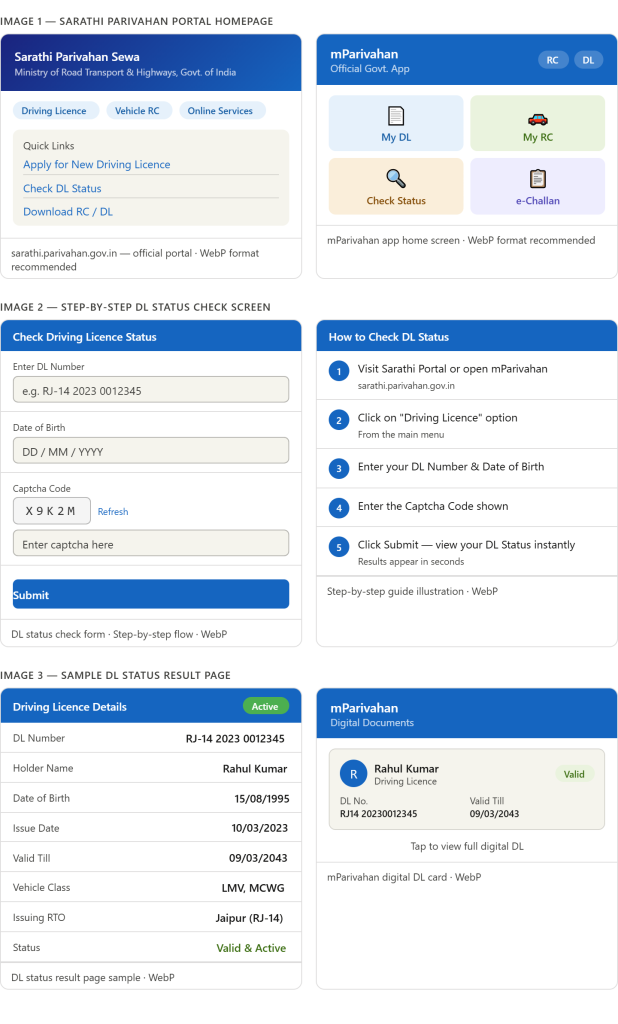
Checking your Driving Licence Status has never been easier! With the mParivahan app and the official Sarathi portal, you can instantly track your DL status from the comfort of your home, no need to visit the RTO office.
✅ Benefits of Checking DL Status Online
- Save Time – No long queues at the RTO office
- Instant Updates – Get real-time status of your licence
- 100% Free – No charges for checking your DL status
- Easy to Use – Simple steps, anyone can do it
- Available 24/7 – Check anytime, anywhere on your phone
📋 Step-by-Step: How to Check Driving Licence Status
- Step 1 – Visit the official Sarathi Parivahan website or open Parivahan app
- Step 2 – Click on “Driving Licence” option
- Step 3 – Enter your DL Number and Date of Birth
- Step 4 – Enter the Captcha Code
- Step 5 – Click “Submit” and view your DL Status instantly
💡 Pro Tip: Always keep your m Parivahan app updated for the best experience and latest features!
mParivahan App Services
| Service | Description |
|---|---|
| Challan Services | Users can easily check and pay their pending traffic challans through the app. It provides real-time challan status updates, challan payment, verify payment status, download challan, view payment receipts, and details such as challan number, date, and reason for penalty. |
| Vehicle Services | The platform lets users easily view all their vehicle details in one place, including the Registration Certificate (RC), ownership information, insurance validity, and fitness status. Users can also apply for a Duplicate RC if the original is lost, update their address on the RC, and manage loan-related services such as Hypothecation Addition (HPA), Hypothecation Continuation (HPC), and Hypothecation Termination (HPT). Other useful services include applying for a No Objection Certificate (NOC), checking application status, updating mobile numbers, viewing and downloading fee receipts, verifying payment status, and downloading important forms and slips, all available online without visiting the RTO office in person. |
| Driving Licence Download Services | Enables users to check driving licence status, verify authenticity, and download a digital DL. Services include Issue of Duplicate DL, Renewal of DL, Replacement of DL, Change of Address in DL, Application Status, DL Extract, International Driving Permit, and Update Mobile Number. |